Your Bank in Your Pocket: The Ultimate, Unofficial Guide to Opening a Mashreq Neo Account in the UAE (With Just Your Emirates ID!)
Hey there! Welcome to Dubai or one of the UAE’s other awesome cities. If you’re here, you’ve probably got your shiny Emirates ID in hand and are looking for a super easy, fast, and modern way to handle your banking.
Remember the old days? To open a simple bank account, you needed a whole folder of documents: passport copy, visa copy, a No Objection Certificate (NOC) from your sponsor or company, a salary certificate, a utility bill to prove your address… Then you had to take a half-day off work, go to the bank, take a number, sit at a counter, answer a million questions, and sign endless forms. And after all that, they’d say, “We’ll let you know in a few days,” and your card would arrive two weeks later.
Well, those days are over! At least, for anyone willing to step into the world of “Neo Banking.”
Today, I’m going to introduce you to one of the most popular and simplest digital banking options in the UAE: Mashreq Neo. This isn’t just a basic guide. In this super-detailed post, I’m going to break down, step-by-step, and in plain English, what “Neo” even is, what it can do for you, and how you can with only your Emirates ID open your bank account in under 10 minutes while lounging on your sofa, and get your debit card delivered to your doorstep.
If you have an Emirates ID and you hate bank queues, this guide was written for you. Let’s go!
Part 1: What is “Mashreq Neo” Anyway?
First, let’s clear up a misconception. “Mashreq Neo” isn’t some tiny, brand-new startup that just appeared yesterday. Neo is, in fact, the fully digital arm of Mashreq Bank.
Mashreq Bank is one of the oldest, largest, and most respected banks in the UAE and the entire Middle East, operating since 1967. So, when you open an account with Neo, you’re actually opening an account with a strong, well-established bank, not some random app. Your money is safe, and everything is fully regulated by the Central Bank of the UAE.
So, what does “Neo” mean?
“Neo” is a prefix meaning “new” or “modern.” A “Neo Bank” is a bank designed from the ground up for the digital and mobile world.
- No Branches (or you don’t need them): Everything, from opening your account to transferring money and paying bills, is done in your mobile app.
- No Paperwork: Like I said, no more folders, copies, and long forms.
- It’s “Warp Speed” Fast: Account opening in minutes, instant transfers, instant card blocking…
- Low (or Zero) Fees: Because they don’t have the costs of physical branches and counter staff, they can offer their services much cheaper, or even free (like having no minimum balance requirement).
Mashreq Neo is Mashreq Bank’s answer to our new lifestyle—a lifestyle where we have no patience for waiting and want everything accessible on our phones.
Part 2: Why Neo? What’s Wrong with Other Banks?
You might be asking, “So what? I can just go to a traditional bank.” Yes, you can. But let me tell you why Neo (and similar neo banks) are a cut above, especially for those of us who are new here or just want an easy life.
1. Account Opening in 5 Minutes, Not 5 Days!
This is its biggest advantage. In this guide, I’ll show you exactly how. You just need your phone, your EID, and a decent internet connection. That’s it. Meanwhile, traditional banks are still stuck in processes that take days, sometimes weeks.
2. Goodbye to “Minimum Balance”
This is one of the most annoying rules of traditional banks in the UAE. Most of them require you to always have, say, AED 3,000 or AED 5,000 in your account. If your balance drops below that for even a day, they’ll hit you with a nice penalty (like AED 25) at the end of the month.
But the “Neo Smart Account” (Neo’s standard account) has ABSOLUTELY NO MINIMUM BALANCE requirement. This means you can have zero dirhams in it and you won’t be charged a single fil. This is fantastic for students, freelancers, or anyone just starting a new job.
3. Low or Zero Fees
- Local Transfers: Free and instant.
- International Transfers: This is where Neo shines. With their “Quick Remit” service, you can send money to countries like India, Pakistan, the Philippines, the UK, and many others with excellent exchange rates and zero or very low fees. This service is significantly faster and cheaper than exchange houses or SWIFT transfers from traditional banks.
4. An App That Actually “Works”!
Some traditional bank apps are so slow and confusing that you’d rather just go to the branch. But the Mashreq Neo app is genuinely well-built, fast, and simple. Everything is at your fingertips, and you won’t get lost.
5. The Perks
Neo isn’t just a dry bank account; it’s a lifestyle.
- Cinema Discounts: Get great deals at Reel or Novo Cinemas.
- Food & Shopping Deals: Tons of Buy-One-Get-One (BOGO) offers at restaurants or discounts on food delivery apps like Talabat.
- Salaam Points: You earn “Salaam Points” on your spending, which you can redeem later.
Part 3: Before We Start: Your Checklist
Okay, enough hyping it up. If you’re convinced Neo is for you, let’s run through this checklist. To open a Mashreq Neo account (specifically for those of us with an Emirates ID), you only need these things:
- Your Original Emirates ID (EID):
- This is the most important thing. You must have the original physical card. A copy or photo won’t work.
- It must be valid and not expired.
- If you don’t have an EID (e.g., you’re a tourist or your visa is still processing), this method will not work for you.
- A Smartphone:
- An Android or iPhone with clean, working front and back cameras.
- You’ll need to install the app on it.
- An Active UAE Mobile Number:
- A number from Etisalat, Du, or Virgin Mobile that’s registered to you (or at least accessible) because you’ll receive an OTP (One-Time Password).
- Fast, Stable Internet:
- Preferably, connect to a good Wi-Fi network. If not, 4G or 5G will do. You don’t want your internet to drop mid-process.
- A Well-Lit Location:
- You’ll need to be in a place with good lighting to scan your EID and take a selfie. Avoid shadows on your face or card.
- Your Precise UAE Address:
- You need to know your full address (building name, apartment number, street, and area). Your bank card will be delivered here.
That’s it! No salary certificate, no NOC, no utility bill. (You will be asked for your employment and income details, but not for proof).

Part 4: Let’s Get to It: Step-by-Step Account Opening
Ready? Grab your phone, put your EID next to you, and follow along:
Step 1: Download the Official “Mashreq Neo” App
- Go to the Google Play Store (for Android) or the App Store (for iPhone).
- Search for: Mashreq Neo
- Important Warning: Watch out for fake apps. The official app has the Mashreq logo and a very high number of downloads. Download the one published by “Mashreq PSC.”
Step 2: Open the App and Begin
- When you open the app, you’ll see a welcome screen.
- Look for the button that says “Open a Neo Account” or “New to Neo? Join Now” or something similar. Tap it.
Step 3: Enter Your Mobile Number
- The first thing it will ask for is your UAE mobile number.
- Enter your number (e.g., 501234567).
- A 6-digit OTP will be sent to you via SMS.
- Enter that code into the app to verify your number.
Step 4: Scan Your Emirates ID (The Most Important Step)
- This is where the magic happens. The app will ask for permission to use your camera. (Tap “Allow” or “OK”).
- You’ll see a frame on the screen.
- First, scan the Front of your EID:
- Place your card on a flat surface (like a table).
- Hold your phone so the card fits perfectly inside the frame.
- Be in good light. Don’t let reflections from a lamp or window spoil the scan.
- Hold it steady. The app will usually capture the image automatically.
- Second, scan the Back of your EID:
- Flip the card over and do the exact same thing for the back.
Step 5: Read the Chip (NFC Scan)
- After scanning, the app will likely ask you to use your phone’s NFC capability to read the data directly from your EID’s smart chip. (This might not happen for everyone, but if it does, don’t panic).
- Just tap the back of your Emirates ID card against the back of your phone (where the NFC sensor is) and hold it for a few seconds.
- The app will securely read all your details (name, date of birth, nationality, etc.).
Step 6: Confirm Your Scanned Details
- The app will now show you a form that it has pre-filled with the information it read from your card.
- Check your Name, Surname, Date of Birth, and EID Number to make sure they’re correct (which they will be 99.9% of the time).
Step 7: Take a Selfie (Biometric Verification)
- Now it’s time to prove that you are you!
- The app will use your phone’s front (selfie) camera.
- Fit your face inside the circular or oval frame it shows you.
- Selfie Tips:
- No sunglasses, hats, or masks. (Regular eyeglasses are usually fine, but if it asks you to remove them, do so).
- Look directly at the camera.
- Be in good light (don’t stand with a window behind you, which makes your face dark).
- The app might ask you to perform a small action, like “Blink,” “Turn your head left,” or “Smile.” This is a “liveness check” to make sure you’re a real person and not just holding a photo up to the camera.
- This selfie will be compared with the photo stored on your EID chip to verify your identity.
Step 8: Fill in Additional Info (KYC)
- The hard part is over. Now, there are just a few routine “Know Your Customer” (KYC) questions that the Central Bank requires all banks to ask.
- Employment Details:
- Employment Status: (e.g., Salaried, Self-Employed, Student, Homemaker).
- Company Name: (If you’re salaried).
- Designation: (e.g., “Sales Manager” or “Software Engineer”).
- Income Details:
- Source of Income: (e.g., “Salary”).
- Monthly Income: It will give you a range (e.g., 5,000-10,000 AED). Select the one that applies. (Try to be honest).
- Address:
- Enter your full, precise home address in the UAE. This is where your card will be sent, so be very accurate.
- Tax Information (FATCA/CRS):
- This is a standard section. It will ask if you are a US citizen or tax resident. If you’re not (which is 99% of us), select “No.”
- It may also ask if you are a tax resident of any country other than the UAE.
Step 9: Choose Your Account Type
- Mashreq Neo usually offers a couple of account types. The one we want, the one with “No Minimum Balance,” is the “Neo Smart Account.”
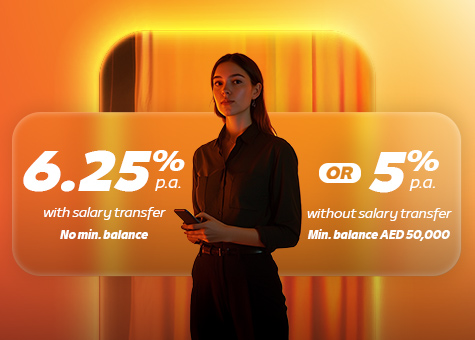
- If you see other options like “Neo Salary Account,” that’s usually for those who plan to transfer their salary to it, and it might come with extra benefits (like a higher interest rate).
- To start, the “Neo Smart Account” is perfect and hassle-free.
Step 10: Security Setup
- You’re at the finish line!
- Username: Create a username you’ll remember (e.g., FarhadDXB2025).
- Password: Choose a strong password (a mix of uppercase, lowercase, numbers, and symbols like @#$).
- Enable Biometrics: The app will ask if you want to log in with your Fingerprint or Face ID. Definitely enable this; it makes life so much easier.
Step 11: Congrats! Your Account is (Almost) Ready!
- After completing these steps, you’ll see a screen that says, “Your application has been received and is under review.”
- This means you are DONE!
- In 90% of cases, within a few minutes to an hour, you’ll get a congratulatory SMS and email saying: “Your account is successfully opened! Welcome!”
- In rare cases (e.g., if your selfie was blurry or your details need a manual check), it might take up to 24-48 hours. But it’s usually very fast.
Part 5: Account’s Open. Now What? (Next Steps)
Congratulations! You now have a Mashreq Neo bank account. Now you just need to do a few small things to get everything ready to use.
A) Wait for Your Debit Card
- As soon as your account is approved, the bank will automatically print and courier your debit card (the card you use for shopping and at ATMs) to the address you provided.
- This card usually arrives within 1 to 3 business days via a courier (like Aramex).
- The driver will call you beforehand. When they arrive, you MUST show them your original Emirates ID to receive the card. (This is for your security).
B) Activate Your Card
- Got your beautiful new card? Now you have to activate it.
- Log in to your Mashreq Neo app (which you can now do with your new username and password).
- Go to the “Cards” section.
- You’ll see your new card there with an option to “Activate Card.”
- Tap it. It will probably ask you to enter the last 4 digits of the card number or the expiry date to confirm you have it.
- It’s activated, just like that!
C) Set Your PIN
- This is another cool part. You don’t need to go to an ATM to create your PIN.
- In that same “Cards” section in the app, find the option to “Set PIN” or “Change PIN.”
- Enter the 4-digit PIN you want to use (twice).
- Done! That’s your card’s PIN.
D) Fund Your Account
- Your account is open, your card is active… but it’s empty! How do you put money in?
- 1. Bank Transfer:
- In the app, go to “Account Details.”
- You’ll see your Account Number and your IBAN (International Bank Account Number). The IBAN is a long number that starts with AE.
- Copy this IBAN.
- Now you can transfer money from any other UAE bank account (your friend’s, your company’s, or an exchange house) to this IBAN.
- 2. Cash Deposit:
- You can go to any Mashreq Bank “CDM” (Cash Deposit Machine) and use your card or account number to deposit physical cash (Dirhams) into your account.
- 3. Salary Transfer:
- You can give your IBAN to your company’s HR department and ask them to send your salary to this account from next month.
Part 6: What Can I Do With This Account? (Daily Uses)
Now that your account has money, let’s see what this “bank in your pocket” can do for you:
1. Daily Purchases (Tap & Go)
Your Neo debit card is “Contactless.” This means for purchases under AED 500 (sometimes AED 100, depends on the machine), you just “tap” your card near the card reader, and you’re done. No PIN, no signature. Perfect for grabbing coffee, groceries, or paying for the metro.
2. Pay All Your Bills
In the app, go to the “Pay Bills” section. You can pay all of these in seconds:
- Utilities: DEWA (Dubai), SEWA (Sharjah), FEWA (other emirates)
- Mobile & Internet: Etisalat, Du, Virgin Mobile (both post-paid bills and pre-paid recharges)
- Road Tolls: Salik (you can top up your Salik account)
- Metro Card: Nol Card (top up your Dubai metro/bus card)
- And a lot more…
3. Quick Remit
As I mentioned, the “Remittance” or “Quick Remit” section is fantastic.
- Instead of going to an exchange house, you can send money to dozens of countries right from your app with some of the best rates.
- For friends sending money to India, Pakistan, the Philippines, Nepal, Sri Lanka, the UK, the US, etc., this service is a game-changer.
- It’s super-fast. Sometimes the money lands in the destination account in just a few minutes.
4. Smart Savings (Saving Pots)
Want to save up for that new iPhone or a trip to Georgia?
- In the app, you can create “Goals” or “Saving Pots.”
- For example, you create a goal called “My Trip” and set it to automatically move AED 500 from your main account to this “pot” every month.
- This separates your savings from your daily spending money, so you’re not-tempted to spend it. Plus, you’ll earn interest on the money in your savings pots.
5. Full Card Control from the App
- Lost Card? If you lose your card, you don’t need to call the bank. Just log in to the app and hit “Block Card” or “Freeze Card.” Your card is instantly and temporarily blocked. If you find it, you can “Unfreeze” it from the app. If it’s gone for good, you can request a new one.
- Online Security: You can disable online transactions and only enable them for the few seconds you need to make an online purchase, then lock it again.
- Limits: You can set your own daily ATM withdrawal limits and purchase limits.
6. Expense Tracker
Neo automatically categorizes your spending. It tells you how much you spent on “Restaurants,” “Groceries,” and “Transport” this month. This helps you understand where your money is going so you can manage it better.
Part 7: Pro-Tips and Security
- Turn on Notifications: Make sure you allow notifications for the Neo app. This way, you get an instant alert for every transaction (even 1 dirham), so you’re always on top of your account.
- App vs. Card PIN: Remember, your app login password is different from your 4-digit card PIN.
- NEVER Share Your OTP: If anyone calls or texts you claiming to be from Mashreq Bank and asks for your OTP, they are a scammer. The bank will NEVER ask for your password or OTP.
- Check the “Salaam” Section: Always poke around the “Salaam Points” and “Offers” section in the app. You’ll find a lot of great discounts you might not know about.
Part 8: Frequently Asked Questions (FAQ)
Q: I have an EID but I don’t work (e.g., spouse visa, student visa). Can I open an account?
A: Yes! This is the beauty of Neo. When it asks for your employment status, you can select “Homemaker,” “Student,” or “Dependent.” Since there’s no minimum balance, it’s not a problem.
Q: I’m under 18. Can I open one?
A: No. You must be 18 or older to open an independent bank account.
Q: My EID scan is failing!
A: First, make sure you’re in good light with no glare. Clean your phone’s camera lens. Place the card on a dark surface for better contrast. If you’ve tried 10 times and it’s not working, your card’s chip or the card itself might have an issue.
Q: My selfie isn’t being approved!
A: Take off any glasses, hats, or masks. Look straight ahead. Make sure the light is in front of your face, not behind you.
Q: Does Mashreq Neo offer Credit Cards?
A: Yes. After your debit account (the one we just opened) is active, you can apply for a credit card from within the app. However, getting a credit card does depend on your monthly salary and will require more documents (like a salary certificate). It’s a separate process.
Q: What if I lose my phone?
A: Don’t worry. Your money is safe because a thief would need your password, fingerprint, or face to log in. Just install the app on a new phone and log in (or call Mashreq’s support) to block access from the old device.
Q: Can I get a cheque book with this account?
A: No. Neo accounts are typically digital-only and do not come with a cheque book. If you absolutely need a cheque book, you would have to open a traditional account at a Mashreq Bank branch. (You can, however, deposit cheques into your Neo account using a smart ATM).

Final Word: Welcome to the New World!
Congratulations. You now have a modern, fast, and efficient bank account in the UAE. See how simple that was? No paper, no queues, no headaches.
Mashreq Neo is an excellent tool for managing your money in the UAE. From paying for your coffee with a simple “tap” to sending money to your family across the world, it’s all right there on the phone in your hand.
Now go and enjoy hassle-free banking!